Saturday, June 15, 2013

IOS 7: What Needs to Happen

Apple has enjoyed a view from the top of the world for the past few years, thanks mainly to products that run iOS, and since WWDC is just around the corner, I've been thinking a lot about the future of Apple's mobile OS. According to Forbes, sales of the iPhone alone dwarf all of Microsoft's sales, not to mention the other products in their lineup, including the entire line of Mac desktop and portable computers, and iPods of various shapes, sizes, and colors.
But while the taste of victory has been sweet for the Cupertino based company, who for many years was the underdog in the PC wars of the 90's and early 00's, some fear that success has led to some stagnation, particularly in the product that has made them the most valuable company in the world.
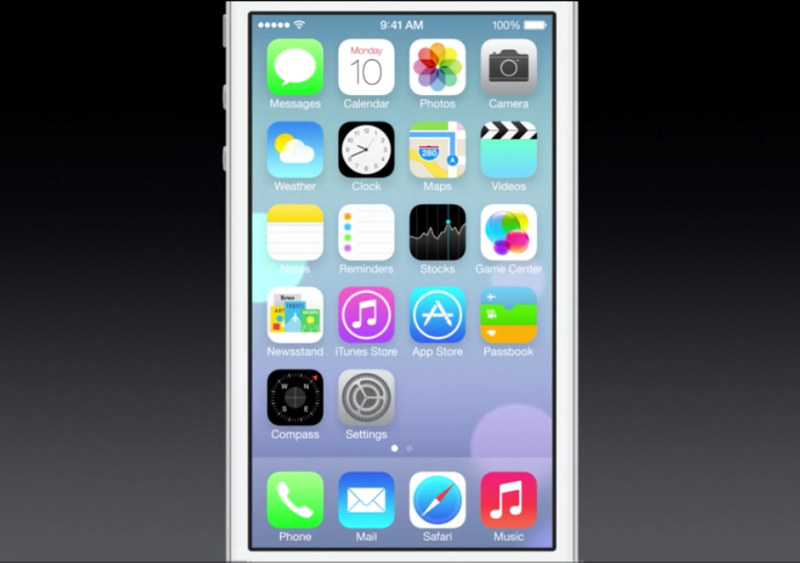
Apple's famous mobile operating system has come a very long way from what it was in 2010 when iPad was announced, but as much as Apple has done with it, they need to step up their game. The most common rumor on the Internet right now is that iOS 7 will feature a "flat" design that reflects Jony Ive's idea of aesthetic appeal, and I am all for that. I think that iOS could definitely benefit from a UI overhaul, and a flat sleek look would be great, not to mention the fact that I love the look of everything Sir Jony has had a hand in designing. But the Android platform has been gaining in popularity and rightly so. Google has been churning out great new feature after great new feature on their mobile OS offering, and aren't showing any signs of stopping. This means that iOS 7 has to be more than the abolishment of skeuomorphism.
When the iPad was first launched, I felt like it was a cool idea and that it would definitely sell, but I failed to see it's potential. To be fair, the state of iOS at the time didn't really make the first iPad the powerhouse that it is today, but I was far from thinking it was much more than an expensive extra device to have around the house. I have done an about-face on the iPad and now firmly believe that it is one of the single most wonderful devices ever created, and has the ability to replace a computer for many people. But in order for it to really replace a computer, a few things need to change. Don't worry, I'm only going to talk about one of them here.
Data Management
When I say "data" management, I'm not referring to the amount of cellular data an iPhone or LTE enabled iPad sends and receives. I'm talking about the user's data that is stored on the device. It's probably the wrong term to use, but I'm at a loss for a better one. Specifically what I'm referring to here is the ability to move data between apps. Currently iOS is getting the crap kicked out of it by Android on this front.
I am all for having the file system in iOS remaining hidden. This idea is part of what has made the iPhone and iPad a success thanks to it's ease of use for people who would need a user's guide otherwise. However, having your hands tied on certain functions is where the current "Open In... " system falls flat. Android boasts a robust system for handling this that allows users to move a piece of data to any app on the device that can handle that type of data. Here's an example of what I'm talking about: I use Evernote *a lot*. When running iOS, if I have a PDF in Evernote that I want to open in a PDF editor like Good Reader, mark it up, and then send it back to Evernote with my annotations, I can't do that.
This seems like a really specific use scenario, but if iOS is going to continue to be Apple's bread and butter, and they are going to continue to dominate the mobile market, workflows that are no-brainers on a desktop operating system have to become something that is at least as easy on iOS. So, bring on the flat, sleek, non-linen look, just so long as it's not the only thing being improved.
Article Source: http://EzineArticles.com/?expert=Colin_Matthew_Tilley

Operating Systems

Introduction to ICT
Short for Information and Communications Technology, it is the study or business of developing and using technology to process information and aid communications.
(eg: voice conversation, email, Processing Business data via computer applications, etc).
Recent years have seen a complete revolution in how information is gathered, archived and used in both business and government around the world. Throughout much of the world, the workplace has been transformed from one based on paper documents, fraught with errors and delays, to one based on information technology (IT).
However, apart from explaining an acronym, there is not a universally accepted definition of ICT? Why? Because the concepts, methods and applications involved in ICT are constantly evolving on an almost daily basis. It's difficult to keep up with the changes - they happen so fast.
Let's focus on the three words behind ICT:
INFORMATION
COMMUNICATIONS
TECHNOLOGY
A good way to think about ICT is to consider all the uses of digital technology that already exist to help individuals, business and organizations use information.
ICT covers any product that will store, retrieve, manipulate, transmit or receive information electronically in a digital form. For example, personal computers, digital television, email, robots.
So ICT is concerned with the storage, retrieval, manipulation, transmit or receipt of digital data. Importantly, it is also concerned with the way these different uses can work each other.
Discuss: Why IT is so important to modern word
In business, ICT is often categorised in o two broad types of product:-
The traditional computer based technologies (things you can typically do on a personal computer or using computers at home or at work); and
The more recent, and fast growing range of digital communication technologies ( which allow people and organizations to communicate and share information digitally )
Traditional Computer Based Technologies
These types of ICT include:
Standard Office Applications - Main Examples
Word processing
E.g. Microsoft Word: Write letters, reports etc
Spreadsheets
E.g. Microsoft Excel; Analise financial information; calculations; create forecasting models etc
Database software
E.g. Oracle, Microsoft SQL Server, Access; Managing data in many forms, from basic lists (e.g. customer contacts through to complex material (e.g. catalog))
Presentation software
E.g. Microsoft Power Point; make presentations, either directly using a computer screen or data projector. Publish in digital format via email or over the Internet.
Desktop publishing
E.g. Adobe In-design, Quark Express, Microsoft Publisher; produce newsletters, magazines and other complex documents.
Graphics software
E.g Adobe Photoshop and Illustrator; Macromedia Freehand and Fireworks; create and edit images such as logos, drawings or pictures for use in DTP, web sites or other publications
Specialist Applications - Examples (there are many!)
Accounting package
E.g Sage, Oracle; Manage an organization;s accounts including revenues/sales, purchases, bank accounts etc. A wide range of system is available ranging from basic packages suitable for small business through to sophisticated ones aimed at multinational companies.
Computer Aided Design
Computer Aided Design (CAD) is the use of computers to assist the design process. Specialized CAD programs exist for many types of design: architectural, engineering, electronics, roadways.
Customer Relations Management (CRM)
Software that allows business to better understand their customer by collecting and analyzing data on them such as their product preferences, buying habits etc. Often linked to software application that run call centers and loyalty cards for example.
Traditional Computer Based Technologies
The C part of ICT refers to the communication of data by electronic means, usually over some distance. This is often achieved via networks of sending and receiving equipment, wires and satellite links.
The technologies involved in communication tend to be complex. You certainly don't need to understand them for your ICT course. However, there are aspects of digital communications that you needs to be aware of. These relate primarily to the types of network and the ways of connecting to the Internet. Let's look at these two briefly.
Internal networks
Usually referred to as local area network (LAN), this involves linking a number of hardware items (input and output devices plus computer processing) together within an office or building.
The aim of LAN is to be able to share hardware facilities such as printers or scanners, software applications and data. This type of network is invaluable in the office environment where colleagues need to have access to common data or programs.
External networks
Often you need to communicate with someone outside your internal network, in this case you will need to be part of a Wide Area Network (WAN). The Internet is the ultimate WAN- it is a vast network of networks.
ICT in a Broader Context
This will almost certainly cover the above examples of ICT in action, perhaps focusing on the use of key applications as spreadsheets, database, presentation, graphics and web design software.
It will also consider the following important topics that deal with the way ICT is used and managed in an organization:
The nature of information (the "I" in ICT)
This covers topics such as the meaning and value of information; how information is controlled; the limitations of ICT; legal considerations.
Management of information
this covers how data is captured, verified and stored for effective use; the manipulation, processing and distribution of information; keeping information secure; designing networks to share information
Information systems strategy
This considers how ICT can be used within a business or organization as part of achieving goals and objectives
As you can see, ICT is a broad and fast-changing subject.
Article Source: http://EzineArticles.com/?expert=Sherina_Jones

How To Evaluate A Fitness Gadget!

It's a billion dollar industry, and growing exponentially. An astounding number of gadgets out there, and associated infomercials claim to transform your pudgy abs into washboard abs with "virtually no effort on your part." Unfortunately, the only thing that they're likely to do is reduce is the balance in your checking account, not your scale.
The truth is, everything looks better on TV, but you have no way of judging the quality of a machine or gadget. When you watch exercise equipment ads on TV, keep in mind the following tips:
1. If the advertisement claims that you can tone up while lying in bed reading a book, watching TV or on the phone, please pass it up. This is the catch phrase used by advertisers to sell to unsuspecting customers.
2. Beware of the phrase "guaranteed or your money back." Always look for the fine print. The manufacturers may promise that you'll lose 10 pounds in 3 weeks, if you follow the program. Incidentally, the program generally involves a low-fat diet and a more vigorous exercise program.
3. Be cautious of hard sell phrases like "three easy payments." One gadget claims to cost "Not $80! Not $60!" but "just 3 easy payments of $14.95." When you add the shipping & handling, and it costs $54.95.
4. Don't be impressed by expert endorsements. This is the oldest trick in the book. It's a sign of money behind marketing, not the quality of the product.
5. Don't pull out your credit card just because a product is not sold in stores. Matter of fact, most of these gadgets are found on store shelves, or will appear in a few weeks. The product is most generally less expensive at the store and you can have the option to test the product to see if you like it.
6. It's no big deal if a product "awarded a U.S. Patent." You could patent a dumbbell for animals if you had the right design. To get a US patent, you need an original idea, not necessarily a good one.
7. Don't believe in a tool that will enable you to build strength and lose fat simultaneously. Building muscle and losing weight are 2 separate fitness goals and require different approaches.
8. Don't be impressed persuaded by scientific terms. Product manufacturers like to use fancy phrases, many of which are not accepted by the medical community.
9. Don't believe that some new contraption is better than free weights or machines. One manufacturer claims that "with free weights or machines, getting the right form is impossible," but with its revolutionary new gadgets, "there's no way to use the gadget improperly."
10. Don't shop when you are desperate, hungry or tired. You are more likely to be 'taken in' by false advertising. Shop when you are feeling your best, so you can make the right decision without being affected by the hype.
For more information about these exercises, and free full color exercise routines, diet plans and grocery lists, visit Best Weight Loss Programs [http://www.best-weight-loss-programs.net/] and Toning For Women. You can train with Nitin at the Phone Fitness Trainer website.
Article Source: http://EzineArticles.com/?expert=Nitin_Chhoda

Friday, June 14, 2013

Sony Xperia Tablet Z available in Malaysia for RM 1,499 and RM 1,999

After a long wait, the Xperia Tablet Z finally available in Malaysia. The Xperia Tablet Z is Sony latest flagship tablet which used to compete with Samsung Galaxy Note 10.1, Apple iPad with Retina Display and Google Nexus 10.

Xperia™ Tablet Z - Experience the best of Sony in a tablet. Special Launch Promotion (14 June - 2 July) - Xperia™ Tablet Z (16GB WIFI) FREE Warranty 1+1 worth RM150; Xperia™ Tablet Z (16GB LTE) FREE power bank SF 2 worth RM329 (*while stock last). Stand a chance to WIN a Sony Smartwatch with RM399 from 14 - 30 June (3 to give away!)

The Xperia Tablet Z is priced at RM 1,499 (16 GB Wi-Fi) and RM 1,999 (16 GB LTE). The Xperia Tablet Z is a water resistant tablet, it has a 10.1" display with 1920 x 1200 resolution and also Mobile Bravia Engine 2.
Read more »

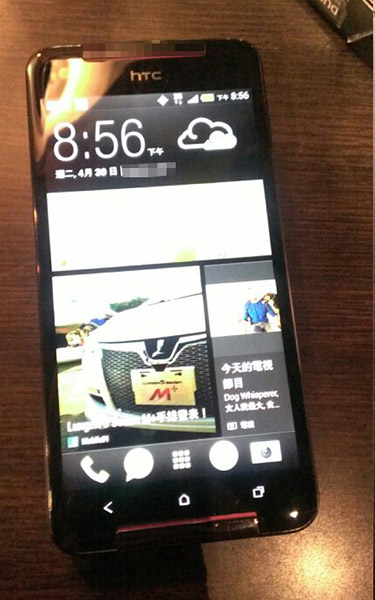
HTC Butterfly S photos showed up with stereo speakers design

HTC is preparing to launch it latest flagship after the One, suggested it will be the HTC Butterfly S which is an upgrade version of HTC Butterfly. We already saw the One mini, now it's time to the HTC Butterfly S.

The HTC Butterfly S is an upgrade version of the first Full HD display smartphone - HTC Butterfly and it comes with One hardware.

Close window

From the photo above, you can see that the HTC Butterfly S is using the same design as the HTC Butterfly, the different is it comes with stereo speakers.
Read more »

Thursday, June 13, 2013

How to Install iOS 7 without Developer Account

Nicely basically declare iOS seven offers arrived at the zenith recently, after that it will not possible be the surprise for you personally simply because the brand new interface is actually simply easy to use. It will likely be publishing this particular drop and our own wait around is going to be more than permanently.
To inform a person something special in iOS seven, Apple company offers conferred iOS seven beta, child like software program with no guarantee which can be shaky as well as pushchair, for your programmers to try to provide suggestions.
How to Install iOS 7 Without Developer's Account
It had been formerly declared after you have improved your own gadget in order to iOS seven then you definitely are not able to recover this back again however it is not really correct, you are able to recover this in order to iOS six. one four or six. one three at any time you would like. It really is sure that upon updating you are going to shed your own jailbreak, however, you may set up iOS seven software on the gadget in case your UDID is actually signed up upon Apple’s programmer system you might as well stick to our own guide to set up iOS seven without having programmer accounts or even signed up UDID.


Since you might be conscious of a few requirements right here, allow us to begin the actual step-by-step guide with regard to setting up iOS seven Beta on the apple iphone five, 4S, four or even apple ipad. To start with you talk to the banks, it is very important realize that you might reduction all of your information, jailbreak or even guarantee along the way in case some thing does not go right. Unless you would like this particular to occur after that overlook this particular article or else, proceed to the next actions.

Notice: You have to one 1 GB totally free disk area along with a quick web connection.
How you can Set up iOS seven upon apple iphone, apple ipad or even ipod itouch
Step one: Down load iOS seven beta through signing up you to ultimately Apple’s programmer accounts you might as well just down load this after this.

Step two: Prior to going any more, get some new i-tunes in order to newest version as well as back-up your whole information.

Step three: Right now get the iDevice in order to DFU setting whilst maintaining this linked to your own desktop computer.

Step four: For those who have Mac pc, after that utilize "Option" as well as Recover upon i-tunes, and when you might have PERSONAL COMPUTER, after that "Shift" as well as Recover.

Step five: Get around the actual appear windowpane towards the document a person down loaded in Step 1.


Step 6: Watch restoration, if you have already registered your UDID then you will be activated automatically. If you want to revert then on Step 5, follow to the iOS 6.1.3 or 6.1.4 file downloaded onto your computer. 


Unlocking your IOS 7 Device
In case your apple iphone is actually revealed to you utilizing MIKE, X-sim, R-sim Ultrasn0w or even Gevey sim I suggest hehehehehehe from IOS seven up-dates. The primary reason could be that the IOS seven will certainly keep track of baseband and you also cannot utilize short-term uncover options. If you are searching with regard to area code your own gadget completely right after or even prior to this particular update, however indicates you need to use the lowest priced manufacturer uncover choice which is carried out along with IMEI quantity.

Sony teased the Xperia Z Ultra with image

It seems that Sony is working on a phablet, the Xperia Z Ultra which codenamed Togari is seems to be announce next month, 4th July. Today, Sony teased its upcoming phablet in a press invite.

Xperia Z Ultra Invite

As you can see in the image above, the press invite reveals one side of the device's sides, you see that it is a slim device. From the design, the upcoming phablet comes with the same design language as Xperia Z.
Read more »

Wednesday, June 12, 2013

Older iDevices would not getting all features from iOS 7

The announcement of iOS 7 makes many iOS users happy and excited. However, there's a bad news telling that not all iOS 7 features will be available to older iDevices.


As you can see, the iPad 2 has the fewest supported features, it only getting iTunes Radio which not important for some users. The iPhone 4 will be getting iTunes Radio, Square photos and Photo filters. Next, iPhone 4S will be working withou Air Drop and Camera filters.

For iPads, none of it will be getting Panorama shooting modes. The most fortunate is iPad with Retina Display (iPad 4), it is getting all iOS 7 features except for Panorama shooting modes. The good news is, iPod touch 5th generation and iPhone 5 will be getting all iOS 7 features.
Read more »

Tuesday, June 11, 2013

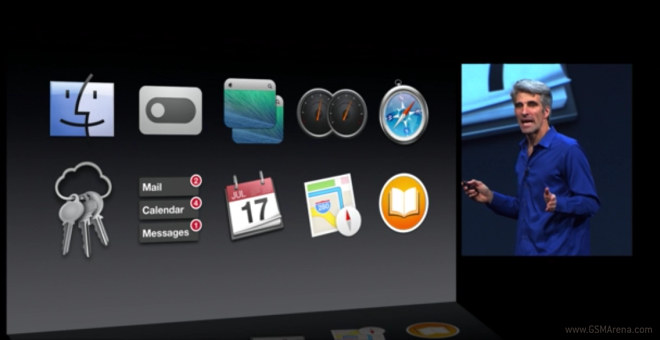
Apple introduces Mac OS X Mavericks and new MacBook Air

Besides iOS 7, Apple has also announced a brand new version for Mac OS X operating system. The new Mac OS X operating system is named as Mac OS X Mavericks.


The new version of Mac OS X is focuses on extended battery life and UI responsiveness. The OpenGL 4 is to optimize graphic drawing, but also other tricks like compressed memory and more. Apple promises that that with this optimizations, the CPU usage will be lower up to 72%.
Read more »

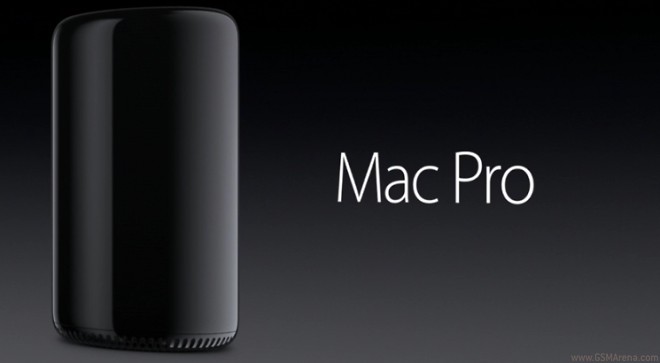
Apple announced that new Mac Pro

WWDC 2013 is not only a stage for iOS 7, Apple has also announced new Mac Pro. The new Mac Pro is 8 times smaller than the previous one.


Although it smaller than the previous one, but it features the new Thunderbolt 2 port (6 of them), new dual GPUs built by AMD and next-gen Intel XEON processors.

The styling has changed and is now sleeker and much more compact. It shape as a small cylinder, it has HDMI out, Motion sensor, which lights up when it detects you, Gigabit Ethernet and 4 USB 3.0 ports.
Read more »

Monday, June 10, 2013

Playstation 4 (PS4) costs only 399$!


PS4 has been one of the hottest talk of 2013! Sony hadn't even shown as how the console looked like until...now! Yes, we now know how the new console looks like and how much it will cost us!
If you are looking forward for getting a new console, PS4 certainly is going to be the one for you! After all, the Xbox One is 100$ expensive than the PS4 and has many restrictions including disability of trading games and going online every 24 hours! 

The PS4 has huge specs bump from the seven year old PS3. The key hardware features of PS4 are :
  1. An eight-core X86 AMD Jaguar CPU clocked at 1.9 GHz
  2. 8GB of GDDR5 RAM
  3.  500 GB Hard-drive 
  4.  Blu-ray drive
  5. Three USB 3.0 ports
  6. 802.11 b/g/n Wi-Fi
  7. Ethernet, HDMI Bluetooth 2.1+EDR
  8. Optical audio and analog AV out
  9. NFC

You can make PS4 yours just for 399$ which includes PS4 console, one controller and one month free subscribion to PS Plus! One clear advantage PS4 has over Xbox One is the ability to play second hand games. Also, PS4 looks much more sexier and compact than the Xbox One and finally it costs a lot less! PS4 will be available for purchase in Spring 2014! 

Thats it for now guys. Stay tuned and stay updated. You can also find me on Facebook and Twitter! Thank you for reading my post!

Source : CNET

Get Started with Xbox One for just 499$

2013! Seems like this is the year for next-gen Game/Home Entertainment Consoles! With the announcement of PS4 and Xbox One, things are getting pretty competitive! Are you getting the Xbox One or the PS4? I am sure you can't decide yet! We haven't even got opportunity to see what PS4 looks like far go its availability and pricing. With such circumstances, you won't be able to decide which console you will be getting in 2013!

However, we now know most of the facts about the Xbox One. We also know how it looks like and finally we know how much it will 
cost! It will cost 499$ plus many goodies. For the price , you get an Xbox One console with  500GB hard drive, Kinect motion sensor , one controller (wireless) , and a free two-week trial of Xbox Live Gold. It sure is pricy but you are getting a lot of goodies out of the box as well. The new kinect is a lot superior and has much more to show off! 
So, that's it guys, you can get Xbox One for 499$ and will officially launch this november! Stay tuned and stay updated!

Source: GSMArena

No iOS 7 for iPhone 3gs!


iOS 7 is finally out. It is the most notable change that we can see since iOS was first released back in 2007! The OS is completely redesigned and looks a lot different than earlier builds of iOS. It isn't out for public right now and is scheduled for fall (no date mentioned) . There are multiple device which made its way to iOS 7. Here is the list of Apple devices which will be getting iOS 7!
  • Apple iPhone 5
  • Apple iPhone 4s
  • Apple iPhone 4
  • Apple iPad 2
  • Apple iPad 3
  • Apple iPad 4
  • Apple iPad Mini
  • Apple iPod Touch 5g
Unfortunately, iPhone 3gs won't be getting iOS 7.So, iPhone 3gs is officially dead and won't be getting further updates. It sure got a lot of updates earlier but the time has finally come! No more updates for iPhone 3gs. So, you better get moving and get a new smartphone!

Share

Twitter Delicious Facebook Digg Stumbleupon Favorites